Case study · Product
Leetify: redesigning the flow, not the site.
Leetify turns a Codeforces problem into one LeetCode-style workspace: statement, editor, tests and submit on a single page, with notes, analytics and account sync. I designed and built the extension, web app and backend end to end. The Chrome Web Store lists it at 20,000 users.
- Store listing
- 20,000 users · 4.3 out of 5 on the Chrome Web Store (checked 7 October 2026)
- Growth
- My reported figures: about 1,000 listed users from community posts, then about 20,000 over roughly three months, with growth following an unpaid creator reel
- My role
- Product design, engineering and launch, solo
- Platform
- Manifest V3 Chrome extension, Next.js web app and API on Vercel; optional sign-in for account sync
- Started
- 27 May 2026, the first repository commit; development continued through October
The problem: five tabs for one problem
A usual Codeforces solve keeps five tabs open for a single problem. The statement and the submit form sit on separate pages, so you can’t read and code at the same time.
The code itself lives in VS Code, notes live in Notion or a notebook, and verdicts land on yet another submissions page. In a timed contest, every switch costs seconds and focus.
I compete on Codeforces myself, so I felt this every round. The goal was to fit the whole solve, from reading to accepted, on one page.
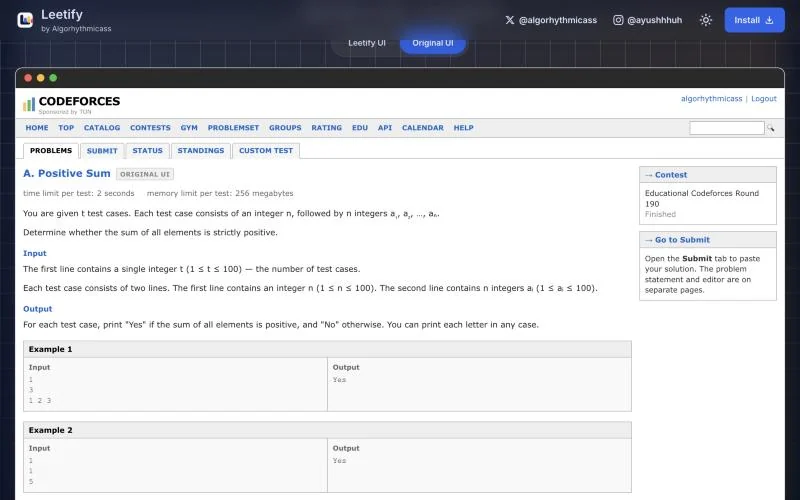 Before: the statement page. The editor is somewhere else.After: the same problem in Leetify.
The principle: redesign the flow, not the site
Codeforces is loved for being open, simple and minimal, so I didn’t redesign it. I reshaped only the part where the friction lived: reading, coding, testing and submitting.
Three rules guided every decision:
- Respect the original. Keep what people already like about Codeforces.
- One page, one flow. Merge the steps people juggle into a single workspace.
- Function over style. Every change has to remove a step. Style is subjective; friction isn’t.
Key decisions
Make it familiar on purpose
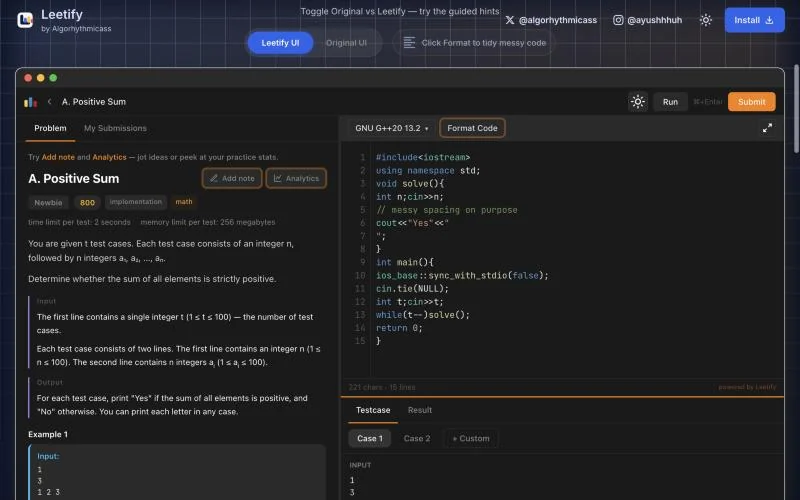
Most competitive programmers already know LeetCode’s workspace: statement on the left, editor on the right, tests below. So Leetify borrows that layout instead of inventing a new one.
The name does the same job. “Leetify” reads as LeetCode-style, for Codeforces. People understood it before installing, had nothing new to learn, and could explain it in one sentence.
Put the whole solve on one page
The statement and a VS Code-style editor sit side by side in resizable panes. You run the samples inline, add your own tests, format messy code in one click, see verdicts in the editor and submit without leaving.
Help people improve, not just solve
In competitive programming, progress lives in the observations: a trick, a mistake, a DP transition. So notes attach to the problem itself, and My Notes finds them again by text, problem, contest, rating or tag.
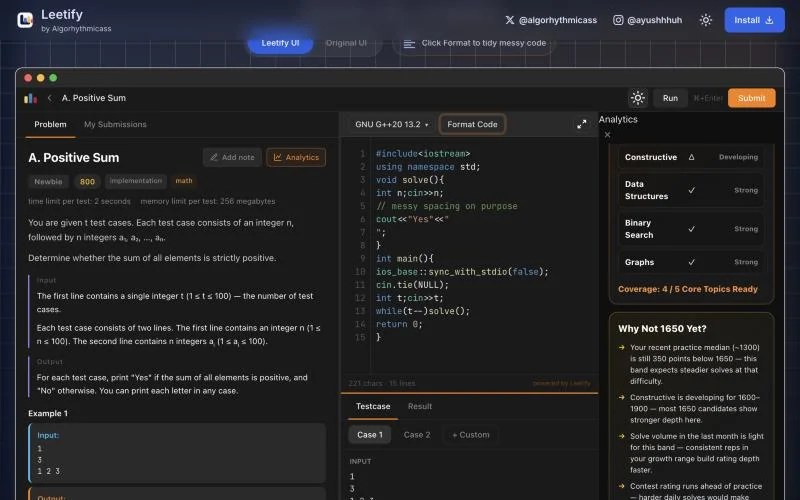
The analytics follow the same idea. Instead of only counting streaks, the training panel explains the gap to your next rating milestone, from practice level to weak topics to volume, then suggests problems that close it.
Leave out what adds friction
The workspace is available without signing in. Account sign-in is there when you want solves, notes and profile data to sync.
The engineering behind account sync
A Codeforces content script needs an identity of its own to sync solves and notes; it cannot rely on the Vercel app’s browser cookie. I built the sign-in, extension token, database migrations and user APIs as one connected system.
- Extension
- TypeScript, Vite 8 and Manifest V3; separate builds for the content script, theme bootstrap, auth bridge, background worker and popup. LightningCSS, KaTeX and highlight.js handle styles, maths and code.
- Web & API
- Next.js 14 App Router, React 18, TypeScript, Tailwind 3 and Zod, hosted on Vercel.
- Auth & data
- Supabase Auth with Google OAuth and email/password; Supabase Postgres for users, solves, streaks and problem notebooks. Extension JWTs use jose and HS256.
- Monitoring
- Vercel Analytics and Speed Insights.
From sign-in to a synced solve
- Sign in on the web app. Supabase handles Google OAuth or email/password; the OAuth callback exchanges the PKCE code. The API syncs the user record, then issues a 30-day extension JWT.
- Hand the identity to the extension. The auth bridge passes the token to the background service worker, which keeps it in Chrome local storage. Content scripts and the popup ask that worker to make authenticated user API requests.
- Verify and sync on the server. Each user API verifies the Bearer token and uses its verified user identity for solves, streaks, notebooks, handles and calibration. The worker requests a refresh when fewer than 24 hours remain before expiry; sign-out clears the extension identity.
Decisions that made the pieces fit
- Separate web and extension auth. An application JWT carries the user IDs and plan, rather than passing the Supabase cookie session into Codeforces pages. The background worker centralises token handling and API traffic.
- Keep the permission boundaries explicit. Browser database clients can read their own rows under row-level security. Server APIs use the Supabase admin client, which bypasses RLS, so those routes enforce ownership through the verified application identity. The extension’s API host permissions target the Vercel origin, with localhost for development. The server enables extension CORS only on extension API paths.
- Migrate accounts without losing their data. I moved from Clerk to Supabase Auth, renamed the stored auth identity and used email linking for legacy user rows.
What shipped: sign-in from extension to web and back, authenticated user sync, token refresh and sign-out, plus production Manifest V3 packaging. A free/pro plan field exists in the data model; paid billing has not been implemented.
Built in increments
- 27–28 May 2026. First repository commit, landing page and auth, and the first extension packages.
- 3–4 June. Analytics, notebooks and extension JWTs; the Supabase Auth migration, tighter browser RLS policies and extension API CORS.
- 2 July. Calibration onboarding and its database migration.
- August–October. Extension release work and landing-page refinements.
Dates above come from repository history, manifests and migrations, rather than Chrome Web Store publication records.
Shipping what users asked for
Leetify ships in small versions, shaped by what users ask for. The extension and listing show version 0.2.2; the landing page’s release notes still stop at 0.1.8.
The biggest features weren’t in the first release. They came from requests, paraphrased below in roughly this order:
- “Make the coding panel behave like a real editor.” The panel became a VS Code-style editor: syntax highlighting, the shortcuts people already use, resizable panes and one-click formatting for messy code.
- “Let me start from my own template.” Templates for C, C++, Java and Python now load with each problem, and you can edit them into your own, so nobody types the same boilerplate twice.
- “I want to keep notes on problems.” My Notes: notes attach to the problem, can be pinned, and are searchable by text, problem, contest, rating or tag.
- “Show me how I’m doing.” The analytics panel: solve streaks, an activity heatmap, difficulty distribution and the suggested next difficulty, with the reasons spelled out.
The 0.1.8 release notes show the kind of detail daily users notice:
- Problem statements render math properly, so constraints read at a glance.
- Sample inputs and outputs keep their line breaks, so multi-line cases match the original.
- C, C++, Java and Python open with starter templates.
- The status bar shows your real cursor line and column, instead of a stuck counter.
Launch and growth: from 1,000 users to 20,000
The first thousand came from showing up where competitive programmers already talk: blog posts on Codeforces, posts on LinkedIn and comments on Instagram coding posts. No ads.
Then, on 3 July 2026, a coding creator, hannin.dev, made an unpaid reel about Leetify. Around that period, the listing grew from about 1,000 users to 20,000. From my first post to that point took about three months. My hypothesis is that the familiar name and layout made the idea easier to explain and share.
- Views
- 800,000+
- Likes
- 24.1k
- Shares
- 20.1k
- Saves
- 27.7k
These are the reel figures I recorded, rather than a measurement of how many viewers installed Leetify. They show why sharing matters; they do not isolate the effect of a design decision.
Results
The Chrome Web Store listing showed 20,000 users and a 4.3 out of 5 rating when checked on 7 October 2026. My launch figures put that at about twenty times the listing count before the reel, reached over roughly three months.
What I learned
- Start from what people know. The familiar layout gives me a useful hypothesis about adoption and sharing; I have not isolated its effect in a controlled test.
- Restraint is a feature. People didn’t want a new Codeforces, just the one they had without the tab juggling.
- Distribution is part of the work. Community posts reached the first users; the larger rise followed a creator sharing the product.